ABC Games: Phonics & Tracing
- 4.7
- Rating
- 5.00M
- Installs
- Free
- Price
 Analysis by App-foxy
I spent time with ABC Games: Phonics & Tracing as a preschool learning game, and my first impression is that it understands the most important thing about early practice: a young child needs quick feedback, simple goals, and enough repetition to feel successful. This is not a replacement for reading with an adult, but it can turn a short spare moment into useful alphabet practice.
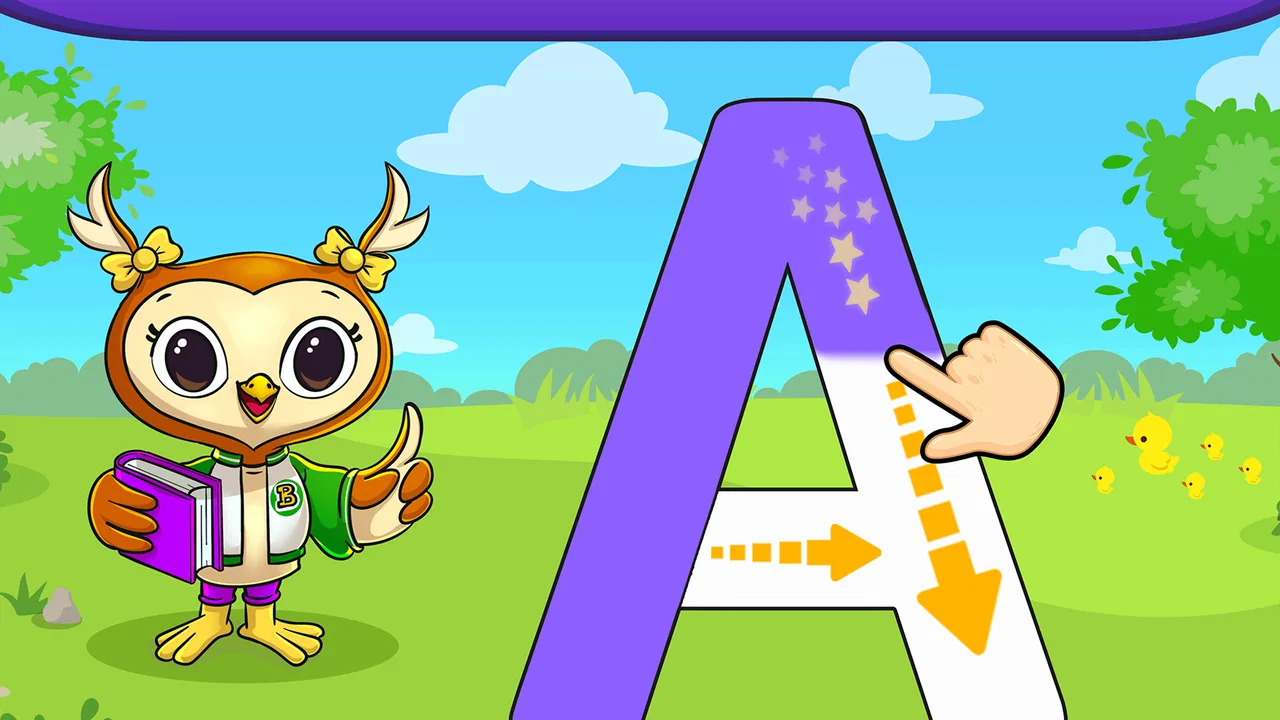
The game is aimed at toddlers and preschoolers who are beginning to recognize letters, connect them with sounds, and control a finger or stylus on a screen. I found it most useful as a guided activity rather than something to leave running indefinitely. A child can explore independently, but the learning value is stronger when an adult occasionally asks what letter appeared, what sound it makes, or which familiar word begins with it.
How the current version feels in everyday use
The current release is version 19.14.09, and the app comes from Bebi Family: preschool learning games for kids. It is a free educational game for Everyone, with optional in-app purchases priced at $2.99 per item. The basic entry cost makes it easy to try before deciding whether it fits a child’s routine.
You May Also Like

 Blood Strike: 2.5 Anniversary
Blood Strike’s Loadouts Turn Every Drop Into a Tactical Gamble
A close look at Blood Strike’s custom loadouts: how fast access to signature weapons reshapes its battle royale rhythm, rewards preparation, and narrows the gap between fights.

 Pandora - Music & Podcasts
Pandora’s Music Is Easy to Start, but Harder to Recover
Pandora’s strength is its low-effort path from a seed to a station. Its weak spot is how much confidence it asks you to place in connection, setup, and quiet recovery.

 8 Ball Pool
 Is Built on Rivalries, Rematches, and Routine
A close look at the rivalries, rematches, shared routines, and unanswered safety questions that turn a quick pool match into a persistent mobile community.

 Samsung Music
’s Quiet Strength Is Playing What You Already Own
Its reach comes less from spectacle than from dependable access to a personal library. That simplicity is both the app’s strongest retention engine and its ceiling.

 AccuWeather: Weather Radar
AccuWeather Review: A Quick, Clear Forecast for Everyday Decisions
For everyday plans, the best forecast is the one you can understand quickly. AccuWeather makes rain timing, radar, and local conditions easy to act on, with a few trade-offs.

 Hill Climb Racing
Why Hill Climb Racing Still Turns Crashes Into One More Run
A tiny car, a bumpy hill and one more upgrade: Hill Climb Racing keeps resurfacing because its simple chaos makes every near-miss feel personal.
More From Our News Desk



In a realistic home situation, I would use it after breakfast while getting a bag ready, or during a short wait at a clinic or restaurant. I would give the child a clear task, such as practicing a few letters, rather than presenting it as an unlimited entertainment session. That small change matters: tracing works better when the child is attentive, and phonics practice is easier to reinforce when someone nearby talks about the sounds.
The experience is deliberately less complicated than a general children’s game. There is no need for a child to understand a long story, manage a character, or remember a complicated set of rules. The focus stays close to letters, early reading awareness, and writing movement. That narrow purpose is a strength for families who want a focused literacy activity, although it may feel repetitive to children looking for broader gameplay.
The store summary highlights an ad-free experience, and that is especially relevant for preschool use. Unwanted interruptions can break concentration or lead a child toward something unrelated. I still recommend that an adult set up the game first and check which parts are available without purchasing anything, because a child-friendly interface does not remove the need for supervision around optional purchases.
What the learning loop does well
The most useful combination here is the link between seeing a letter, hearing or considering its sound, and attempting a tracing movement. Those skills are related but not identical. A child may recognize a capital letter while still struggling to form it, or may repeat a sound without connecting it to the written symbol. Switching between these tasks gives parents a chance to notice which part needs more help.
I would not rush through every activity just to cover the alphabet. A better approach is to pause after a successful attempt and ask the child to find the same letter on a cereal box, point to it in a book, or name a word that starts with it. This turns the screen exercise into a bridge to real-world reading instead of an isolated tapping routine.
Tracing also benefits from short sessions. Young children can lose accuracy when their hands become tired or when they are trying to finish quickly. If a child begins dragging across the screen without following the intended path, I would stop and return later rather than treating the loss of precision as failure. The app is most helpful when it supports practice, not when it becomes a test.
What the latest release tells existing users
The release date is October 30, 2019, so this is an established product rather than a brand-new experiment. The current version number shows that the app has continued through later revisions, but I would separate that fact from assumptions about a major redesign. A newer version can reflect maintenance and refinement without changing the central learning approach.
For someone who already uses it, the sensible expectation is continuity: the familiar alphabet-and-tracing purpose remains the reason to keep it installed. I would update it when the device offers the opportunity, then spend a minute checking the child’s usual activities before handing over the tablet. That simple check helps identify whether the interaction still feels comfortable after an update.
Families considering a switch from an older installation should also remember that a version change does not automatically mean that every child will notice a dramatic difference. Preschoolers usually care more about whether the instructions are understandable and whether the activities respond reliably than about technical changes they cannot see. The practical test is whether your child can begin without repeated adult intervention.
The app has reached over 5 million installs, with a 4.7 average from around 31 thousand ratings and roughly 2.3 thousand written reviews. Those figures suggest that it has found a substantial audience, but they should not replace a personal trial. Early-learning preferences vary widely: one child may enjoy repeating letter shapes, while another may need movement, stories, physical cards, or a teacher’s voice.
How it affects a child’s routine
I see the strongest use case as a small, repeatable literacy station. Put the device on a stable surface, choose a quiet moment, and stay close enough to turn screen actions into conversation. After the game presents a letter, ask the child to say it before offering help. During tracing, encourage a slower movement and praise careful effort rather than only a perfect result.
One practical technique is to pair screen practice with a physical follow-up. After a session, write the same letter on paper in large strokes and let the child copy it with a crayon. The app can provide a visual model, while paper adds a different hand movement and removes the temptation to rely only on a responsive screen. This combination is more valuable than increasing screen time.
Another useful routine is to focus on letters from the child’s name or favorite objects first, when the available activity allows it. Familiar meaning can make an abstract symbol feel important. I would then return to less familiar letters gradually, watching whether the child is recognizing them or simply memorizing the order in which they appear.
For travel, the game is convenient because it offers a contained activity that does not require a collection of cards or a workbook. However, I would download and prepare everything before leaving home, test the sound level, and avoid assuming that a child will remain engaged for a long journey. A few minutes of focused practice is a realistic goal; it is not a complete travel solution.
Where the experience still has limits
The biggest limitation is that an app cannot fully judge how a child understands language. A child might trace a shape correctly by following visual cues while still not recognizing the letter later on paper. Conversely, a child may know the letter but have immature fine-motor control. An adult needs to distinguish those situations instead of treating every successful or unsuccessful screen action as a complete measure of learning.
Phonics is also more than matching one symbol with one sound. Pronunciation changes across words and accents, and early reading involves blending sounds, hearing differences, and building vocabulary. This game can support the first step, but it should sit beside shared reading, conversation, songs, and real writing. If your main goal is sentence reading or a structured curriculum, a dedicated literacy program may be a better central tool.
The tracing format may not suit every child. Some children dislike repeating shapes, while others need larger physical movements before they can manage controlled finger paths. A tablet can also encourage a light, quick touch that does not transfer neatly to pencil pressure. I would skip this as the primary option for a child who becomes frustrated by tracing and choose hands-on letter tiles, magnetic boards, or teacher-led activities instead.
There is also a supervision trade-off. The content rating is Everyone, which is appropriate for a broad family audience, but age suitability is not the same as developmental fit. A two-year-old may need more help with instructions and turn-taking than an older preschooler. I would watch the first sessions and adjust expectations rather than assuming that the label alone tells me how independently a child can use it.
Optional purchases are another point to handle carefully. Since the game is free to start and offers items at $2.99 each, I would make any buying decision myself and explain to the child that not every visible option is automatically available. This is less about the amount and more about preventing accidental taps and keeping the activity focused on learning rather than unlocking content.
How it compares with familiar alternatives
Compared with alphabet videos, this game offers more active participation. A child has to touch, trace, and respond instead of only watching. That can make it easier to notice whether the child is engaged, but videos may be better for introducing a song, a story, or a lively pronunciation model.
Compared with alphabet flashcards, the app provides immediate visual interaction and a guided digital task. Flashcards are easier to share between siblings, require no battery, and encourage face-to-face questioning. I prefer flashcards when I want to test recognition in a new setting, because they show whether the child knows a letter away from the app’s familiar interface.
Compared with handwriting workbooks, the game is more forgiving and can feel less demanding at the beginning. A workbook, however, develops pencil control and leaves a physical record of progress. For a child preparing for school writing, I would use the game as a warm-up and paper as the more important follow-through.
Compared with a broad preschool learning suite, this title is easier to understand because its purpose is narrower. A larger suite may cover numbers, puzzles, colors, memory, and stories in one place, which is useful for variety. The trade-off is that a child may jump between activities without spending enough time on letter formation. I would choose this game when alphabet practice is the immediate priority, not when I want one app to cover every early-learning area.
Who should try it, and who should pass
I would recommend trying it if your child is showing interest in letters, enjoys repeating short visual tasks, or needs a gentle introduction to tracing. It is also a reasonable choice for parents who want a free starting point and prefer an ad-free learning activity with a clear educational focus. The developer’s specialization in preschool learning games is consistent with that focused audience.
I would be more cautious if your child needs accessibility features, extensive spoken instruction, or a formal progression that a teacher can monitor. I would also look elsewhere if you want advanced reading comprehension, sentence construction, detailed handwriting assessment, or a game built around physical movement. Those needs go beyond what an alphabet-and-tracing activity should be expected to provide.
Parents should also ask whether the child enjoys the method. If the child repeatedly guesses, skips the tracing, or asks for unrelated entertainment, forcing longer sessions will not improve the result. In that case, keep the app as an occasional option or replace it with a story, a letter hunt around the house, or a tactile activity. The best early-learning tool is the one that supports regular, calm practice.
What I would watch over time
When using the current version, I would pay attention to whether the child’s screen success transfers to unfamiliar letters on paper, in books, and on signs. I would also watch for progress in naming sounds without prompts and in tracing more deliberately. These observations are more meaningful than simply counting completed activities.
I would also watch how future updates affect the balance between simplicity and variety. For this kind of game, extra content is not automatically an improvement. New options are useful only if they remain easy for a preschooler to understand and do not distract from letter recognition, phonics, and controlled movement.
My overall view is positive but measured. Its real strength is focused, low-pressure alphabet practice that works best in short sessions with an adult nearby. It is not a complete reading course, and it cannot replace books, conversation, or handwriting on paper. Used as one part of a broader routine, though, it gives families a practical way to make early letter practice more interactive.
Because it is free to begin, I think it is worth testing with a child for a few calm sessions rather than judging it from the description alone. If the child responds well to tracing and simple phonics work, it can become a useful part of the day. If not, that result is helpful too: it tells you to choose a more physical, story-led, or structured alternative instead of pushing a format that does not fit.
FAQs for ABC Games: Phonics & Tracing
01What is ABC Games: Phonics & Tracing designed to teach?
ABC Games: Phonics & Tracing is an early-learning app focused on helping children recognize letters, connect them with their sounds, and practice writing through tracing activities. It generally combines colorful visuals, spoken phonics, and simple interactive exercises, making it suitable for preschoolers and kindergarten-age children who are beginning to learn the alphabet or need extra practice with letter formation.
02Is ABC Games: Phonics & Tracing suitable for my child’s age?
The app is mainly intended for young learners who are being introduced to letters, phonics, and basic handwriting skills. It may work especially well for preschool and early kindergarten children, although the ideal age depends on the child’s reading level, attention span, and familiarity with touch-screen controls. Parents should review the app’s store listing and try the activities to confirm that the difficulty matches their child.
03Does the app require an internet connection to work?
Many educational activities in ABC Games: Phonics & Tracing may be available after the app has been installed, but internet requirements can vary depending on the version and device. An online connection may be needed for downloading the app, restoring purchases, displaying advertisements, or receiving updates. If you plan to use it while traveling, open the main games beforehand and check whether the required content works offline.
04Are there advertisements, in-app purchases, or parental controls?
Before allowing a child to use ABC Games: Phonics & Tracing independently, parents should check the current store description and the app’s settings for advertising, paid unlocks, subscriptions, and parental options. Educational apps sometimes offer free activities while reserving additional content for purchase. It is also wise to enable device-level purchase restrictions and supervise the first sessions, especially if the app is installed on a shared phone or tablet.
05Does ABC Games: Phonics & Tracing replace preschool or parent-guided learning?
No. The app can be a useful supplement for practicing letter recognition, phonics, and tracing, but it should not replace interaction with parents, teachers, books, handwriting materials, or real-world language activities. Children often learn more effectively when an adult repeats the sounds, corrects tracing gently, and connects each letter to familiar words. Short, regular sessions are usually more productive than extended unsupervised play.
Pros
- Playful activities make early phonics practice feel engaging.
- Tracing exercises help children build letter-writing confidence.
- Simple navigation is suitable for preschool learners.
- Useful for short practice sessions at home or on the go.
- Supports learning through repetition and visual feedback.
Cons
- Some activities may become repetitive after extended use.
- Younger children may still need adult guidance to begin.
- Progress tracking may be limited for parents and teachers.
- The app may offer less value once basic letters are mastered.
- Device audio is important for getting the most from phonics activities.

ABC Games: Phonics & Tracing
Gallery